

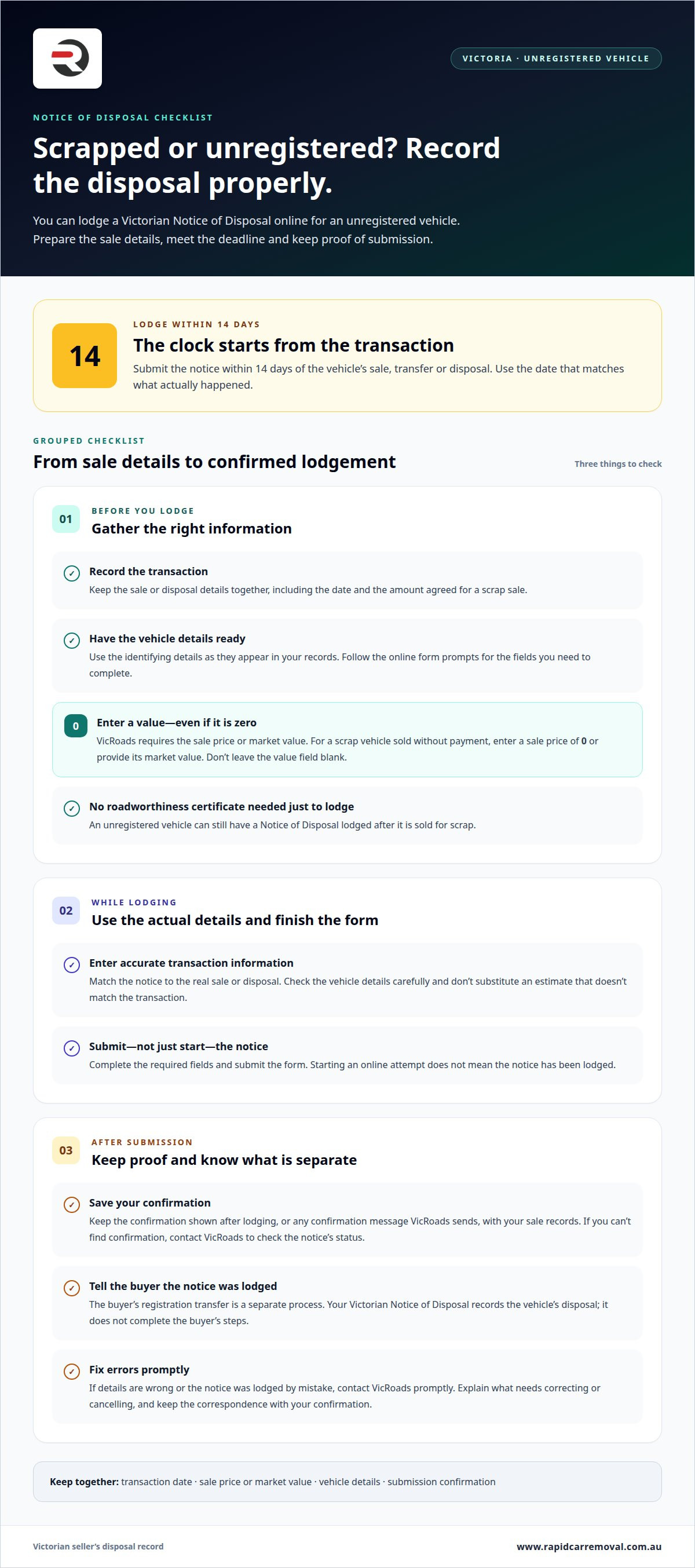
An unregistered vehicle can still have a VicRoads notice of disposal lodged online after it’s sold for scrap. You don’t need a roadworthiness certificate just to lodge the notice, and in Victoria it must be lodged within 14 days of the sale, transfer or disposal.
It’s easy to assume a vehicle needs current registration before you can complete the disposal paperwork. The key is to record the disposal promptly and provide the details VicRoads asks for, even when the vehicle is no longer on the road.
This guide explains how to lodge a VicRoads notice of disposal online, what information you’ll need and how the process applies to an unregistered vehicle. It also covers what to do when an unwanted car is ready to go, so you can move from paperwork to disposal with less uncertainty.
Key Takeaways
- Learn whether you can lodge a disposal notice for an unregistered vehicle, including one sold for scrap.
- Keep the Victorian 14-day lodgement deadline in mind after a sale, transfer or disposal.
- See what sale details you’ll need to provide, including when the vehicle’s value is zero.
- Understand which points to consider when selling interstate or to a dealer, and how the online process works with or without a myVicRoads account.
Can I lodge a disposal for an unregistered vehicle?
Yes. If you’re disposing of an unregistered vehicle for scrap, check the applicable notice process before you lodge. You don’t need a roadworthiness certificate just to lodge the notice. Before starting the online process, have the sale details ready, including the vehicle’s value.
Use these steps to prepare the information and follow up after submission:
- Record the disposal details. Note that the vehicle was sold or disposed of, and keep the transaction information together. For a scrap sale, record the agreed amount or the vehicle’s market value. VicRoads requires a seller to provide the sale price or market value, even when the amount is zero. Don’t leave the value field blank simply because the vehicle was scrapped without payment.
- Gather the vehicle information requested online. Keep the vehicle’s identifying details available while completing the form. Enter them as they appear in your records, and take care not to mix up details from another vehicle. The online form’s prompts determine which fields you must complete.
- Enter the disposal information accurately. Use the actual transaction details rather than an estimate that doesn’t match the sale. If the vehicle went for scrap and the sale price was zero, provide zero as its sale price or give its market value. Accurate entries help prevent avoidable follow-up over the recorded disposal.
- Keep evidence of submission. Save the confirmation shown after lodging, or retain any confirmation message VicRoads sends. To check whether VicRoads has received the notice, look for that submission confirmation and keep it with your sale records. If you can’t find confirmation, contact VicRoads and ask about the notice’s status.
- Tell the buyer the notice was lodged. The buyer should arrange the registration transfer using the relevant process for their circumstances. In NSW, a buyer might be able to transfer a vehicle’s registration online within 14 days of the sale to avoid late fees, according to Service NSW. That NSW timeframe concerns the buyer’s registration transfer, not the Victorian seller’s disposal notice.
- Act promptly if information needs changing. If you entered incorrect details or lodged the notice by mistake, contact VicRoads promptly. Explain which details are wrong, or that the disposal notice needs cancelling, and provide the correct transaction information. Keep any correspondence and your original submission confirmation together.
For a Victorian scrap sale, lodge the notice within 14 days of the disposal. The seller’s notice records the vehicle’s disposal; it doesn’t replace the buyer’s steps for transferring registration. Keep the sale details, value and submission confirmation together so you can refer to the same information if questions arise.
When Must the Notice Be Lodged?
In Victoria, lodge a vehicle Notice of Disposal within 14 days of its sale, transfer or disposal. Treat the date the relevant transaction happens as your starting point. Plan to submit promptly, rather than leaving the notice until the deadline is close.
- Identify the event that starts your task. The deadline applies after a sale, transfer or disposal. Match your notice to what actually happened. For example, if you sold the vehicle, use the sale as your reference point. If you disposed of it another way, record that event instead.
- Note the transaction date. Write down the date the sale, transfer or disposal occurred. Keep it with your sale records and vehicle details. This gives you a clear reference when preparing the notice. Don’t rely on memory if paperwork or messages already record the date.
- Set a reminder to lodge within 14 days. Add a calendar reminder soon after the transaction. Choose a date that leaves time to complete the online form before the 14-day period ends. A reminder helps prevent the notice being overlooked while you organise other sale paperwork.
- Submit once the details are ready. Gather the transaction information and lodge the notice without unnecessary delay. If you need to find a vehicle detail or confirm the recorded sale information, do that promptly. Don’t wait until the final day to begin preparing the submission.
- Allow time to deal with an incomplete attempt. Starting the process isn’t the same as lodging the notice. Complete the required fields and submit the form. Keep any submission confirmation with your sale records. If the online process doesn’t complete, act quickly to resolve the issue.
- Keep the deadline separate from the buyer’s actions. The seller’s Victorian notice records the disposal. It doesn’t mean the buyer has completed any separate registration steps. Keep your own lodgement task on track, even if the buyer is arranging their paperwork independently.
- Make the paperwork part of your sale routine. Record the transaction date when you finalise the sale, then prepare the notice straight away. This simple sequence ties the date to the correct vehicle and reduces the chance of overlooking the 14-day deadline.
If you’re arranging vehicle removal alongside the sale paperwork, get in touch about your vehicle’s next step. Keep the disposal date recorded so the notice remains on your list.
When completing the notice, provide the sale price or market value. VicRoads requires this information when a seller lodges a Notice of Disposal, even if the amount is 0. Check which value applies to your transaction and have it ready with the other details before submitting. Do not leave the field blank on the assumption that a zero amount removes the requirement. Including this information as you prepare the submission can help you complete the lodgement without needing to return to it later.
How to submit a VicRoads notice of disposal online
- Open the VicRoads online service. Locate the Notice of Disposal process through VicRoads’ online services. Use the seller’s details and the records for the vehicle involved. Start with the correct vehicle, especially if you manage paperwork for more than one vehicle. Follow the prompts displayed on the VicRoads form.
- Prepare the transaction details. Have the sale or disposal date and buyer information available. Use the details recorded for the actual transaction. If you sold the vehicle to a person, enter that buyer’s information as requested. If a dealer took the vehicle, use the dealer’s transaction details rather than guessing at missing information.
- Enter the vehicle identifiers carefully. Use the details requested by VicRoads to identify the vehicle. Read each field before entering information, and compare your entries with the vehicle records. A mistaken identifier can associate the notice with the wrong vehicle. Don’t rely on a partial recollection when your documents show the full detail.
- Provide the sale price or market value. VicRoads requires one of these values when lodging a Notice of Disposal, even if the amount is zero. For example, if a scrap disposal involved no payment, enter zero where the form asks for the sale price, or provide the market value as applicable. Don’t leave the value field blank for a zero-price transaction.
- Review the completed form. Check the vehicle details, buyer information, transaction date and value against your records. Confirm that each answer refers to the same sale or disposal. Correct an entry before submission if it doesn’t match the transaction. This final review helps avoid sending VicRoads conflicting or incomplete information.
- Submit the notice through VicRoads. Follow the final on-screen prompts to lodge the completed form. Don’t treat a saved draft or an unfinished screen as a submitted notice. Wait until the process confirms submission before closing the page or moving to another task.
- Keep the submission record. Save or record the confirmation displayed after lodging. Keep it with the sale documents, including the date and vehicle details. If no confirmation appears, don’t assume VicRoads received the notice. Use VicRoads’ available contact channels to ask about its status.
- Retain the transaction evidence. Keep relevant sale records alongside the submission confirmation. For a scrap sale, this may include the receipt or other record showing the disposal details. Use the same information if you need to discuss an entry with VicRoads or explain what was submitted.
How to submit a VicRoads notice of disposal without a myVicRoads account
You can also lodge a Victorian Notice of Disposal in person at a VicRoads Customer Service Centre if you don’t want to use a myVicRoads account. This is an in-person option, not an online submission. Prepare the required information before visiting the centre.
- Choose the in-person route. If you don’t have a myVicRoads account, plan to lodge at a VicRoads Customer Service Centre. The online process and an in-person lodgement are different methods. Don’t assume that an online form can be submitted without account access.
- Gather the disposal information. Before travelling, put the transaction details and vehicle information together. Use the records for the vehicle you sold or disposed of. Keeping those details in one place makes it easier to give VicRoads consistent information at the counter.
- Bring the sale or disposal record. Take the information that records what happened to the vehicle. For example, use your sale paperwork or other transaction record as a reference. The notice needs to reflect the actual disposal, so avoid relying on memory for dates or buyer details.
- Explain that you’re lodging a Notice of Disposal. At the VicRoads Customer Service Centre, tell staff you need to lodge the notice without signing into myVicRoads. State whether the vehicle was sold, transferred or otherwise disposed of. This helps direct the request to the correct transaction.
- Provide the requested details. Give VicRoads the vehicle and transaction information needed for the notice. Read each detail back against your records before it is entered. If a field is unclear, ask what information it requires rather than guessing or using details from another vehicle.
- Check the completed information. Review the disposal details before the notice is finalised. Confirm that the correct vehicle and transaction are recorded. Pay particular attention to names, dates and the vehicle identifiers you supplied. Raise any mismatch while you’re still at the counter.
- Ask for a record of lodgement. Before leaving the VicRoads Customer Service Centre, ask how to keep evidence that the notice was lodged. Retain any receipt or confirmation with your sale paperwork. That record helps you refer to the submission if questions arise later.
- Keep the buyer’s next step separate. Your notice records the disposal; it doesn’t complete the buyer’s registration transfer. Keep your own lodgement record, and give the buyer the transaction information they need for their separate registration process.
Can a notice of disposal be lodged online for a vehicle sold interstate or to a dealer
- Identify which registration record the sale concerns. Start by checking whether the vehicle is recorded with VicRoads. This matters because a Victorian Notice of Disposal reports a disposal to VicRoads. An interstate buyer or dealer doesn’t change the sale details you need to report.
- Use the VicRoads process for a Victorian disposal. If the vehicle’s disposal is being reported to VicRoads, follow its Notice of Disposal process. Enter the actual transaction details shown in your records. Don’t substitute another state’s registration process for the Victorian notice.
- Enter the buyer’s details accurately. For a private interstate sale, use the buyer’s transaction details as requested by the form. For a dealer sale, use the dealership’s details recorded for the transaction. Keep the paperwork nearby so names and other requested information match the sale.
- Record the correct transaction date. Use the date the sale, transfer or disposal occurred. Victoria’s notice must be lodged within 14 days of that event. An interstate destination or dealer involvement doesn’t change the stated Victorian deadline.
- Provide the sale price or market value. VicRoads requires the seller to provide the sale price or market value, even when the amount is zero. For example, enter zero if that is the sale price. Don’t leave the value field empty just because a dealer took the vehicle.
- Check what the notice does and doesn’t record. A Notice of Disposal tells VicRoads that the vehicle has been sold, transferred or disposed of. Keep the buyer’s or dealer’s own registration arrangements separate from your seller’s notice. A Victorian disposal notice is not proof of steps taken under another state’s system.
- Review the information before submission. Compare the vehicle, buyer or dealer, transaction date and value with your sale record. Correct any mismatch before lodging. Keep the submission confirmation with the paperwork, particularly for an interstate sale where later queries may involve details from more than one jurisdiction.
- Use the appropriate next step if online entry fails. Don’t assume a notice has been lodged if the form won’t accept the transaction details or no confirmation appears. A Victorian seller can lodge a Notice of Disposal in person at a VicRoads Customer Service Centre. Keep the transaction record available for that process.
If you’re organising the sale of an unwanted vehicle, contact us to discuss your vehicle.
Rapid Car Removal
After arranging the VicRoads notice, Rapid Car Removal can help with the vehicle’s next step. Its Free Car Removal service includes free towing and removal across Melbourne for unwanted vehicles, including damaged and unregistered cars. The seller remains responsible for lodging the Notice of Disposal with VicRoads and keeping the submission record. Rapid Car Removal also handles accident car removal and scrap truck removal. Keep your sale details together as you arrange collection, so the paperwork and vehicle handover are clear. Contact Rapid Car Removal to discuss removal of your vehicle.
Take the next step with your vehicle
After completing the VicRoads notice of disposal online process, arrange what needs to happen to the vehicle itself. If it’s unwanted, Rapid Car Removal provides free vehicle removal across Melbourne, including for damaged and unregistered cars. Keep your paperwork and vehicle arrangements separate, and retain your sale records for reference.
Rapid Car Removal offers Cash for Cars, Free Car Removal and Scrap Truck Removal in Melbourne. These services can help when you’re moving on from a car or arranging truck disposal. The Notice of Disposal remains your responsibility to lodge with VicRoads, while vehicle removal is a separate step.
Ready to discuss your vehicle? Contact Rapid Car Removal today. Take one clear step at a time, and you’ll be ready to move forward.
Frequently Asked Questions
Is there a fee for lodging a disposal?
The sale price or market value entered on the notice is transaction information, not a fee for lodging it. If you disposed of the vehicle for no payment, enter zero as its sale price. Keep the amount separate from the vehicle’s value, and review the details before submitting the form.
What do you need for a notice of disposal?
Have the vehicle’s identifying details and the sale or disposal information ready. You’ll also need the buyer or recipient details requested by the form, plus the transaction value. If you gave the vehicle to someone rather than selling it, enter the actual disposal details rather than assuming a sale price.
What information is needed to lodge a VicRoads notice of disposal?
Prepare the vehicle details, transaction date, buyer details and sale price or market value. VicRoads requires a value even when the amount is zero. Use your sale record to keep names and transaction information consistent. For a dealer sale, refer to the dealer’s paperwork rather than relying on memory.
How long does a seller have to notify VicRoads after selling a vehicle?
A seller must lodge the Victorian notice within 14 days of the sale. Record the transaction date when the sale is completed, then set a reminder to lodge promptly. For example, if paperwork is signed on the sale date, keep that record with your vehicle details so you can refer to the right transaction while completing the notice.
Does lodging a notice of disposal with VicRoads cost anything?
The vehicle’s value is separate from any lodgement charge. VicRoads requires the sale price or market value, including when the value is zero. Review the submission details carefully, and don’t confuse the vehicle’s recorded value with an amount payable to lodge the notice.
What happens if a VicRoads notice of disposal is submitted late or not submitted?
The Victorian deadline is 14 days after the sale, transfer or disposal. If you’ve missed it, lodge the notice as soon as you can and keep the submission record with your sale documents. If you’re unsure whether VicRoads received an earlier attempt, contact VicRoads about its status rather than submitting duplicate details without checking.


